

Install on MacOS
This walkthrough should get you up and running with Libation on your Mac.
Supports macOS 13 (Ventura) and above
Install Libation
Download the file from the latest release and extract it.
- Apple Silicon (M1, M2, ...):
Libation.x.x.x-macOS-chardonnay-arm64.dmg - Intel:
Libation.x.x.x-macOS-chardonnay-x64.dmg
- Apple Silicon (M1, M2, ...):
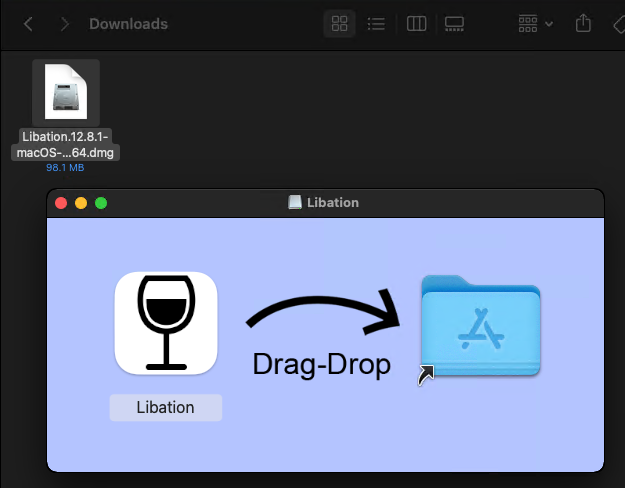
Mount the dmg and open the disk folder (should open automatically). Drag-drop the Libation app into your Applications folder.
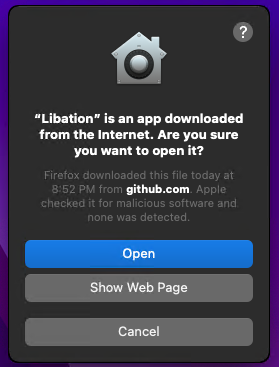
Go to your applications folder and double-click Libation to start it. The first time you run Libation, you'll be asked if you want to run this program downloaded from the internet. Click "Open".
Running Hangover
Libation comes with a recovery app called Hangover. You can start it by running this command:
open /Applications/Libation.app --args hangoverTroubleshooting
See the macOS section of Troubleshooting especially when:
- Libation does not start
- Hangover does not help
- You hit Gatekeeper or quarantine issues
Running LibationCli
Libation comes with a command-line interface. Unfortunately, due to the way apps are sandboxed on mac, its use is somewhat limited. To open a new sandboxed terminal in LibationCli's directory, run the following command:
open /Applications/Libation.app --args cliTo use LibationCli from an unsandboxed terminal, you must disable gatekeeper again and run the program directly at /Applications/Libation.app/Contents/MacOS/LibationCli
Then use ./LibationCli to execute a command.